Dev Notes
A Complete Guide to Unity Object Pooling With Unity Instantiate and Unity SetActive Explained
Unity object pooling exists to solve one specific complaint, the kind any Unity object pooling tutorial from the last decade opens with: spawning and destroying the same kind of object over and over, dozens of times a second, is slow and messy. A vehicle combat game firing weapons, spawning debris, or resetting explosion effects can hit that wall within the first few seconds of a real match. The fix hasn't really changed in a decade, reuse instead of recreate, but the tools for doing it have. Where a project once needed a hand-rolled pooling manager, Unity now ships one directly in the engine.
This guide covers both versions: the classic manual approach that most Unity object pooling tutorial content from the mid-2010s taught, and the built-in UnityEngine.Pool namespace that replaces most of it today. Along the way it works through Unity Instantiate, Unity SetActive, and the specific Unity Rigidbody performance issues that show up once objects start getting reused instead of freshly created.
What Unity Object Pooling Actually Solves
Every call to Object.Instantiate allocates memory and runs a full set of Awake, OnEnable, and Start callbacks. Every call to Object.Destroy marks that memory for cleanup and eventually triggers a garbage collection pass. Neither is expensive in isolation. Fired forty times a second from eight machine guns on a battlefield of destructible vehicles, both add up into visible frame-time spikes, usually right when the most is happening on screen and a stutter is most noticeable.
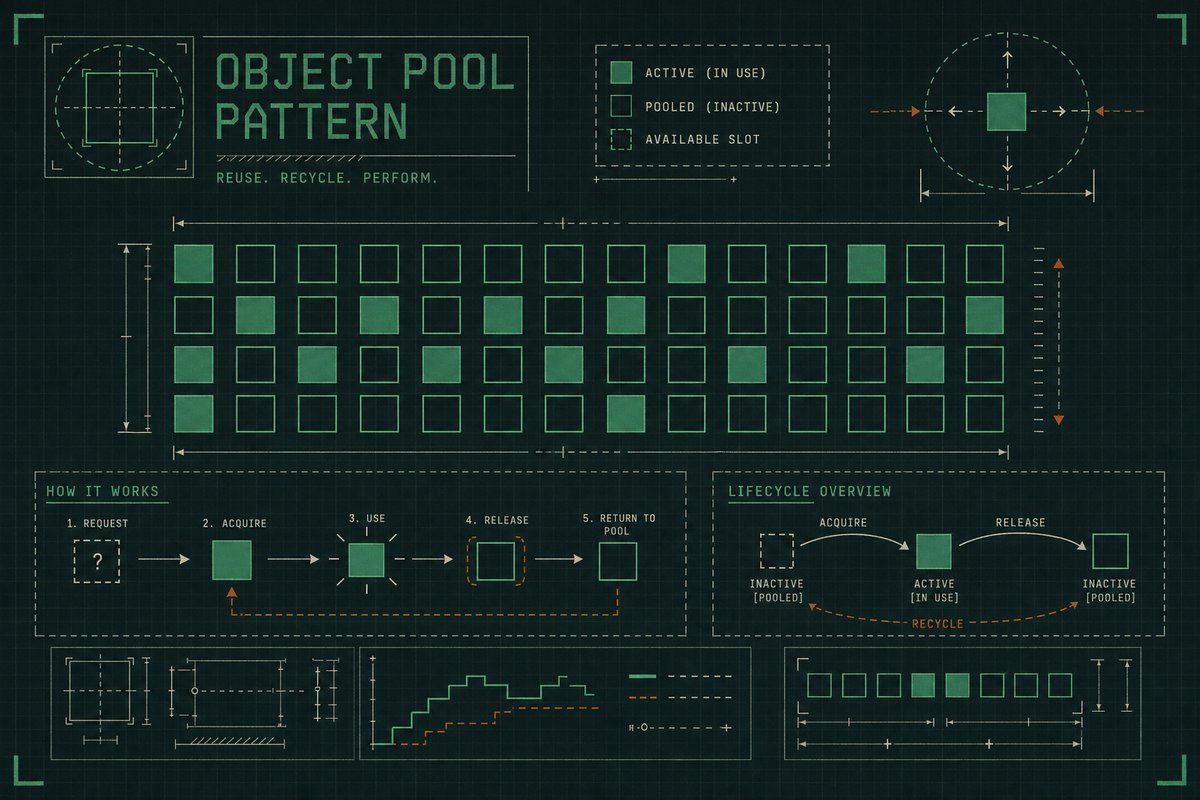
Unity object pooling sidesteps both costs by creating a fixed batch of objects once, then toggling their active state on and off instead of constructing and discarding them. The object never actually goes away; it just steps offscreen and waits.
The Manual Pooling Manager: How It Worked Before ObjectPool<T>
The 2013–2017 approach to this problem, and the one most Unity object pooling tutorial writeups from that era describe, was a hand-built singleton pooling manager, usually backed by a Dictionary<string, Queue<GameObject>> keyed by prefab name:
public class PoolManager : MonoBehaviour
{
    public static PoolManager Instance;
    private readonly Dictionary<string, Queue<GameObject>> pools = new();

    void Awake() => Instance = this;

    public GameObject Spawn(GameObject prefab, Vector3 position, Quaternion rotation)
    {
        if (!pools.TryGetValue(prefab.name, out var queue) || queue.Count == 0)
        {
            var created = Instantiate(prefab, position, rotation);
            created.name = prefab.name;
            return created;
        }

        var instance = queue.Dequeue();
        instance.transform.SetPositionAndRotation(position, rotation);
        instance.SetActive(true);
        return instance;
    }

    public void Despawn(GameObject instance)
    {
        instance.SetActive(false);
        if (!pools.TryGetValue(instance.name, out var queue))
        {
            queue = new Queue<GameObject>();
            pools[instance.name] = queue;
        }
        queue.Enqueue(instance);
    }
}
It works, and plenty of shipped games still run some variant of it. But it also means every project reinvents thread-safety, capacity limits, and cleanup logic on its own, which is exactly what changed with Unity's native pooling support.
Unity Object Pooling Today: the ObjectPool<T> API
Since roughly Unity 2021, the engine ships UnityEngine.Pool.ObjectPool<T> directly, alongside a simpler static GenericPool<T> wrapper, per Unity's documentation. Hand-rolling a pooling manager from scratch is no longer necessary for most cases; ObjectPool<T> takes four callbacks, create, get, release, and destroy, plus a starting capacity, and manages the underlying collection itself:
using UnityEngine.Pool;

public class ProjectilePool : MonoBehaviour
{
    [SerializeField] private Projectile prefab;
    private ObjectPool<Projectile> pool;

    void Awake()
    {
        pool = new ObjectPool<Projectile>(
            createFunc: () => Instantiate(prefab),
            actionOnGet: p => p.gameObject.SetActive(true),
            actionOnRelease: p => p.gameObject.SetActive(false),
            actionOnDestroy: p => Destroy(p.gameObject),
            collectionCheck: true,
            defaultCapacity: 32,
            maxSize: 256);
    }

    public Projectile Fire(Vector3 position, Quaternion rotation)
    {
        var projectile = pool.Get();
        projectile.transform.SetPositionAndRotation(position, rotation);
        return projectile;
    }

    public void Return(Projectile projectile) => pool.Release(projectile);
}
Per Unity's own performance guidance, ObjectPool<T> stores instances in a stack-like collection with no guarantee of memory contiguity, and it is explicitly not thread-safe, so pooling from a background job still needs its own locking. For the overwhelming majority of gameplay code, a single MonoBehaviour owning one pool per prefab type is enough.
GenericPool<T> for Quick, One-Off Cases
GenericPool<T> wraps the same mechanism as a static, shared pool keyed by type, useful for small utility objects that don't need per-instance configuration. For anything with meaningful setup, like a projectile with its own damage values or a debris chunk with its own physics material, the explicit ObjectPool<T> instance is the better fit.
Unity Instantiate vs Pooling: When Each One Makes Sense
The Unity Instantiate vs pooling decision comes down almost entirely to spawn frequency. A one-off object, a level's exit portal, a boss that appears once per match, gains nothing from a pool and just adds bookkeeping overhead. The Unity Instantiate vs pooling line is usually drawn somewhere around objects that spawn more than a handful of times per second, or objects whose Awake/Start callbacks do enough work that repeating them constantly becomes its own cost.
Bullets, hit-impact particles, tire smoke, and destructible debris chunks sit firmly on the pooling side of that line. Menu buttons and one-time cutscene props do not. Somewhere in the middle sit objects that spawn often but not constantly, a boss's periodic special attack, say, where either choice works and the deciding factor becomes whatever the rest of the codebase already leans toward.
It's worth measuring rather than guessing on borderline cases. The Unity Profiler's GC Alloc column for a given frame makes the Unity Instantiate vs pooling question concrete instead of theoretical: if repeated Instantiate calls show up as a real allocation spike during play, the object belongs in a pool; if they barely register, leave the code simpler and skip the pool entirely.
Unity SetActive and the State-Reset Problem
Unity SetActive toggles a GameObject's active flag, which stops its Update loop and hides its renderers, but it does not reset anything else about the object. A pooled projectile that was already halfway through a lerp, or already rotated ninety degrees from a previous shot, comes back from the pool in exactly that state unless something resets it explicitly. Unity SetActive is the visibility switch, not a reset button, and treating it as one is the single most common bug in a first pooling implementation.
The fix is almost always the same: reset transform, velocity, and any timers in the actionOnGet callback, right before or right after Unity SetActive runs, never as an afterthought bolted onto whatever code originally spawned the object.
SetActive(false) does not clear a Rigidbody's velocity, does not reset animator state, and does not cancel running Coroutines started on that object. All three need explicit cleanup in a release callback.
Unity Rigidbody Performance in Pooled Objects
Unity Rigidbody performance problems in a pooled object almost always trace back to leftover velocity. A projectile pulled from the pool inherits whatever linear and angular velocity it had the moment it was released, since SetActive(false) freezes the Rigidbody's simulation without zeroing its state. Reactivate it without clearing that velocity and it launches from the new spawn point still carrying speed and spin from its last flight.
Unity Rigidbody performance also suffers when a pooled object's collider re-enables mid-frame in an overlapping position, generating a burst of collision events the physics engine has to resolve immediately. Clearing velocity, resetting angular velocity, and repositioning the object before re-enabling its collider, in that order, avoids both problems:
actionOnGet: p =>
{
    p.gameObject.SetActive(true);
    var rb = p.GetComponent<Rigidbody>();
    rb.linearVelocity = Vector3.zero;
    rb.angularVelocity = Vector3.zero;
}
Pooling Projectiles and Debris in a Vehicle Combat Game
A vehicle combat game generates pooling candidates constantly: cannon shells, rocket trails, sheared-off chassis panels, and the smoke plumes trailing a damaged engine all spawn and despawn far more often than any menu object ever will. Debris chunks are worth a second look specifically, since they usually carry both a Rigidbody and a short-lived trail or particle effect of their own, meaning a single despawn needs to reset physics state, visual state, and any attached child effects together, not just the parent object's active flag.
A separate pool per debris archetype, small chassis panel, wheel, weapon mount, keeps each pool's createFunc simple and avoids one giant pool trying to serve wildly different prefab shapes.
Common Object Pooling Pitfalls
Forgetting Coroutines
A Coroutine started on a pooled object keeps running even after Unity SetActive disables the object, then resumes unexpectedly, and often incorrectly, the next time it's reactivated. Stop all Coroutines on the object explicitly during release.
Undersized Starting Capacity
A pool with too small a defaultCapacity spends its first few seconds constantly growing, which reintroduces the exact allocation cost pooling exists to avoid. Sizing the initial capacity to a realistic worst case, four active weapons firing at once, say, rather than the common case avoids that warm-up cost entirely.
Treating Pooling as a Garbage Collection Fix Alone
Pooling reduces garbage collection pressure, but its bigger win on most projects is avoiding repeated Awake/Start work and repeated component lookups. A prefab with an expensive Start method benefits from pooling even if its actual memory footprint is tiny.
Pooling the Parent Without Pooling the Children
A debris chunk or a projectile rarely stands alone; it usually drags a trail, a particle system, or a child light along with it. Resetting the parent object's transform and Rigidbody while leaving its attached trail effect mid-fade from its previous use is an easy oversight, and it shows up as a brief flash of the old effect the instant the object reactivates. The release callback needs to walk the whole hierarchy, not just the object it was called on, clearing any child TrailRenderer or ParticleSystem alongside the parent's own state.
Warming Pools During a Loading Screen
A pool's first batch of objects still has to be created somewhere, and creating fifty projectiles the instant a match starts, right as the player expects control, is exactly the kind of frame spike pooling is supposed to prevent. Warming the pool during a loading screen or a level-transition fade, when a stutter is invisible, moves that cost to a moment nobody notices:
public class PoolWarmup : MonoBehaviour
{
    [SerializeField] private ProjectilePool pool;
    [SerializeField] private int warmupCount = 32;

    public void WarmUp()
    {
        var warmed = new Projectile[warmupCount];
        for (int i = 0; i < warmupCount; i++)
            warmed[i] = pool.Fire(Vector3.zero, Quaternion.identity);

        foreach (var p in warmed)
            pool.Return(p);
    }
}
Firing and immediately returning each instance forces the pool to create its full starting batch up front, so the first real shot fired in gameplay reuses an object that's already been through Awake and OnEnable once, rather than paying that cost for the first time under pressure.
Frequently Asked Questions
What is Unity object pooling?
Unity object pooling is the practice of pre-creating a batch of objects once and reusing them by toggling their active state, instead of repeatedly calling Instantiate and Destroy for objects that spawn frequently, like bullets or particle effects.
Why is Unity Instantiate slow at runtime?
Unity Instantiate allocates new memory for the object and runs its full Awake, OnEnable, and Start lifecycle every single call. Called a handful of times it's unnoticeable; called dozens of times a second, from repeated gunfire or explosions, the combined cost shows up as frame-time spikes.
How is pooling different from just calling Unity Instantiate every time?
Pooling creates the object once and reactivates it later with SetActive, skipping the allocation and lifecycle callbacks entirely on reuse. Calling Instantiate every time repeats that full setup cost on every single spawn, regardless of how many times the same prefab has already been created.
What does Unity SetActive actually do in a pooling setup?
Unity SetActive enables or disables a GameObject, which stops its Update loop and hides its renderers and colliders while it's inactive. It's the visibility mechanism pooling relies on, but it does not reset any state on the object by itself.
Why doesn't Unity SetActive fully reset a pooled object?
SetActive only toggles visibility and script execution. Velocity, animator parameters, running Coroutines, and any custom fields on the object's scripts all persist across a SetActive(false)/SetActive(true) cycle unless a release or get callback resets them explicitly.
What is UnityEngine.Pool.ObjectPool<T>?
It's the built-in generic pooling class Unity has shipped since roughly Unity 2021, taking create, get, release, and destroy callbacks plus a starting and maximum capacity, and handling the underlying collection internally so projects no longer need to write their own pooling manager.
Do I still need to write my own pooling manager?
For nearly all common cases, no. ObjectPool<T> covers the same ground a hand-rolled singleton manager used to, with less code and no custom queue-management logic to maintain.
What is GenericPool<T> and when should I use it over ObjectPool<T>?
GenericPool<T> is a static, type-keyed wrapper around the same pooling mechanism, suited to small utility objects without per-instance setup. Anything with real configuration, damage values, physics materials, custom prefabs, is better served by an explicit ObjectPool<T> instance.
Is Unity's built-in object pool thread-safe?
No. Unity's documentation is explicit that ObjectPool<T> is not thread-safe, so any pooling access from a background job or a separate thread needs its own locking around Get and Release calls.
What Unity Rigidbody performance issues show up in pooled objects?
The most common Unity Rigidbody performance issue is a pooled object retaining its previous linear and angular velocity, since disabling a GameObject freezes physics simulation without clearing that state. A second is a collider re-enabling in an overlapping position and generating an unexpected burst of collision events.
How do I reset a Rigidbody's velocity when reusing a pooled object?
Set both linearVelocity and angularVelocity to Vector3.zero in the pool's actionOnGet callback, before repositioning the object, so it never carries speed or spin over from its previous use.
Should I pool bullets and projectiles in a vehicle combat game?
Yes. Projectiles, hit-impact effects, and debris chunks are exactly the kind of high-frequency, short-lived objects pooling is built for, especially once several vehicles are firing weapons and shedding parts in the same match.
How large should a pool's starting capacity be?
Size it to a realistic worst case rather than the average case, enough active projectiles to cover every weapon on screen firing at once, so the pool doesn't spend its first seconds growing and paying the exact allocation cost pooling is meant to avoid.
What happens if a pool runs out of available objects?
ObjectPool<T> creates a new instance on demand via its createFunc when the pool is empty, up to the configured maxSize. Past that limit, additional Get calls still return a new instance, but it won't be retained on Release, so sizing maxSize appropriately still matters.
Does object pooling only help with garbage collection?
No. Reduced garbage collection pressure is one benefit, but avoiding repeated Awake and Start execution, and repeated GetComponent lookups, is often the bigger practical win, particularly for prefabs with non-trivial setup logic.
Is object pooling still worth doing in current versions of Unity?
Yes, if anything it's easier to justify now that ObjectPool<T> ships in the engine and removes most of the boilerplate a manual pooling manager used to require. The performance case for pooling high-frequency objects hasn't changed; only the implementation effort has gone down.
Conclusion
A single ObjectPool<T> instance, a get callback that clears velocity and repositions the object, and a release callback that stops any running Coroutines replaces most of what a custom pooling manager used to do by hand. The remaining decisions, pool sizing, one pool per prefab archetype versus one shared pool, are tuning problems, not architecture problems, and they're much easier to get wrong on the sizing side than on the mechanism itself.